
Updated

Tool Roundup
Best GTA 6 Clipping Tools, Compared Honestly
We compared these tools on 14 November 2026, before GTA VI's 19 November release, so none of them had been run on GTA VI footage. This compares what each tool takes in, what it does with gameplay, and what it costs, with OpenClip's own gaps included.
Grand Theft Auto VI artwork and logo: Rockstar Games.
The best GTA 6 clipping tool depends on your footage. For commentary, reaction and RP streams, OpenClip, StoryCut and Klap find moments from speech and take Twitch and Kick links. For silent single-player gameplay, pick a tool that reads visuals, such as OpusClip's paid ClipAnything, OpenShorts or Zoupyu, because OpenClip picks moments mainly from speech. No tool had been tested on GTA VI footage by 14 November 2026.
Facecam over gameplay
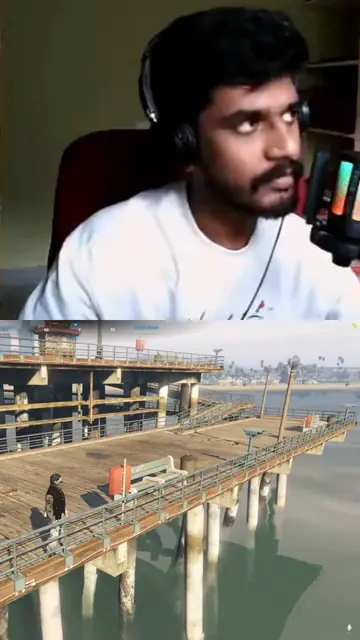
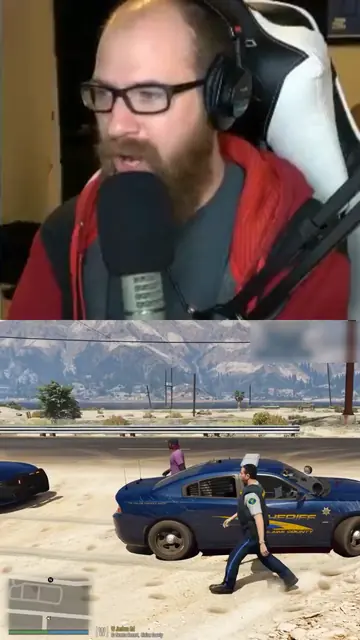
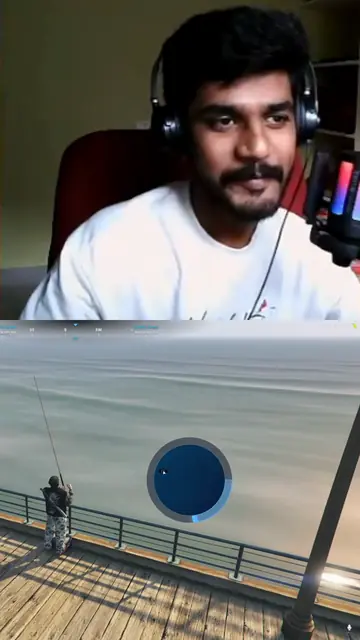
Frames from clips in the Facecam over gameplay layout: the streamer's camera on top, the game below. Pick it for your brand under Clip layout. We made these from GTA V streams, before GTA VI's 19 November 2026 release.
Feature Comparison
Swipe the table to compare →
| Feature | OpenClip | Other tools on this page |
|---|---|---|
| Twitch and Kick links | Yes. Paste a past broadcast or VOD link once the stream has ended | StoryCut, StreamLadder and Klap take both. OpusClip takes Twitch on Pro and Business. OpenShorts and Zoupyu take Twitch only. Eklipse connects to your own channel instead |
| PS5 and Xbox recordings | Upload WebM or MP4 as it is, or paste a OneDrive share link | StoryCut, OpenShorts and Klap take uploads. Medal imports console clips through the Xbox and PlayStation apps |
| Gameplay with no commentary | Not well. Moments come mainly from speech, so gameplay with no commentary can give few clips or none | OpusClip's paid ClipAnything, OpenShorts and Zoupyu read visuals or audio spikes. Eklipse detects game events |
| Facecam above the gameplay | Yes. Set Clip layout to Facecam over gameplay in your Brand settings to put the cam on top and the game below. Auto, the default, does it when it finds a webcam at the edge of the frame | StoryCut, Klap, Zoupyu and Twitch Clips stack the cam on top. StreamLadder lets you place it by hand |
| Price for long streams | 1 credit per source minute, $3.60 to $6.00 per source hour. Trim first to pay for less | Zoupyu hour packs from about $0.61 an hour. Flat monthly plans from $9 (StoryCut) to $79 (Klap Pro) |
| Free way to try | 3-day trial with 60 credits. It needs a card, and trial clips carry a watermark | OpusClip free plan, a free first video on OpenShorts and StoryCut, 3 free videos on Zoupyu |
The Tools
OpenClip
Cloud tool that turns long videos into captioned 9:16 clips. Takes Twitch past broadcasts, Kick VODs, YouTube video and live links, Google Drive, Dropbox, OneDrive, Vimeo and Rumble links, and direct uploads including PS5 WebM files. Finds moments from the transcript and the loudness of the audio.
Pros
- A scored shortlist from a long VOD or console recording
- A Gaming video type, plus clip guidance (such as skip story scenes) and a max clip length per video
- A Facecam over gameplay layout that puts the cam on top and the game below
- Word-level captions in 57 presets and 30+ languages
- Works inside Claude and ChatGPT through its MCP server
Cons
- Built around speech: gameplay with no commentary can give few clips or none
- 1 credit per source minute, so an 8 hour stream costs 480 credits
- The free trial needs a card, and trial clips carry a watermark
Best for: Commentary, reaction and RP streams, and console recordings with your voice on
Pricing: Starter $14.99/mo (150 min), Pro $24.99/mo (350 min), Business $89.99/mo (1,500 min); 3-day trial with 60 credits
OpusClip
The best known AI clip maker. Has a gameplay layout on every plan and ClipAnything, which picks moments from visuals and sound as well as speech, on paid plans. No GTA page (per StoryCut, 5 November 2026).
Pros
- Gameplay layout on all plans
- Can clip from visuals and sound, not only speech, on paid plans
- Free plan with 60 credits a month
Cons
- Twitch import only on Pro and Business
- Free plan clips by spoken words only, with a watermark, and files expire after 3 days
Best for: Gameplay with little commentary, if you pay for ClipAnything
Pricing: Free; Starter $15/mo; Pro $29/mo (opus.pro, checked 13 November 2026)
Eklipse
Gaming clip tool that connects to your Twitch, Kick, YouTube or Facebook channel and clips after each stream. Detects game events, audio spikes and chat activity, and supports GTA V. Its own GTA page says to treat GTA VI detection as unconfirmed.
Pros
- Automatic clips of your own streams
- Game event and chat detection, not only speech
- Free browser tool to reframe a GTA clip to 9:16
Cons
- No free plan since June 2026
- Console clipping needs the session to be streamed live; an unstreamed recording must be exported and uploaded
Best for: Streamers who want clips of their own channel after every stream
Pricing: Premium $24.99/mo or $179.99/yr; Premium Pro $39.99/mo (eklipse.gg, checked 13 November 2026)
StoryCut
Clip tool with a GTA 6 clip maker page. Takes Twitch, Kick, YouTube, Drive and Dropbox links and console recordings, finds the webcam box automatically and puts the cam on top, and has a gaming mode without facecam.
Pros
- Facecam detection with cam-on-top layout
- Twitch and Kick links on all plans
- Publishes a Rockstar policy table and launch calendar
Cons
- Refuses near-silent video
- Free plan is 1 video a month, 30 minutes, 720p, with a watermark
Best for: Commentary and RP streams where you want a stacked cam layout
Pricing: From $9/mo, $7/mo billed yearly (storycut.com, updated 5 November 2026)
StreamLadder
Streamer clip editor focused on Twitch and Kick. Detects the facecam with boxes you can move, and its ClipGPT feature applies a saved layout and captions. Takes VODs up to 10 hours.
Pros
- Twitch and Kick links
- Reliable manual control over dual-cam layouts
- Scheduler and montage maker included
Cons
- Free tier is editor only at 720p
- AI clipping (ClipGPT) starts on the Creator plan
Best for: Streamers who want hands-on control of the layout
Pricing: Starter $14.99/mo, Creator $26.99/mo, Pro $38.99/mo (App Store listing, checked 13 November 2026)
Klap
Link-in, clips-out tool. Takes YouTube, Twitch, Kick, Vimeo, Drive and Dropbox links and stacks the facecam over the game automatically. Moment picking is mostly from speech.
Pros
- Auto gaming layout
- Twitch and Kick links
Cons
- Videos up to 3 hours
- Downloads need a paid plan, and plans are capped by clip count
Best for: Streams under 3 hours with plenty of talk
Pricing: Basic $29/mo for 100 clips, Pro $79/mo; about half billed yearly (third-party review, checked 29 September 2026)
OpenShorts
Open source clip maker with a GTA 6 page. Takes Twitch VODs and clips, YouTube and uploads. Puts a corner webcam in an inset, and analyses silent footage with a vision model, without captions.
Pros
- Handles silent gameplay with vision
- First video free up to 60 minutes, no card
- Open source and self-hostable
Cons
- Silent clips get no captions
- Says nothing on its page was measured on GTA 6 footage
Best for: Silent single-player captures, or teams that want to self-host
Pricing: $12 to $59/mo (openshorts.app, updated 7 November 2026)
Zoupyu
GTA 6 clip maker sold in hour packs with no subscription. Takes Twitch VOD and YouTube links, clips silent footage from audio spikes, scene cuts and vision, and puts the facecam above the gameplay.
Pros
- Cheapest per hour of footage
- Credits never expire
- 3 free videos with no card
Cons
- No Kick links
- Hour packs only, with no flat plan for heavy daily use
Best for: Long launch streams on a budget
Pricing: 12 hours $9, 30 hours $19, 80 hours $49 (zoupyu.com, checked 13 November 2026)
Medal
Clip recorder and gamer feed. Records on PC and mobile only; console clips are imported (Xbox has a built-in import, PS5 clips go through the PlayStation App). GTA VI has no PC version at launch, so Medal cannot record or auto-clip it.
Pros
- Large gamer audience on its own feed
- Simple sharing of short clips
Cons
- No recording or auto-clipping of console GTA VI
- No stream VOD links
Best for: Sharing short console clips with other players
Pricing: Free with watermark; Premium $9.99/mo or $7.99/mo yearly (medal.tv, June 2026)
Twitch Clips
Twitch's own clip button. Clips up to 60 seconds of a stream and makes a portrait version automatically, with the cam and gameplay stacked.
Pros
- Free and instant
- Portrait version with a stacked layout
Cons
- One manual clip at a time
- Twitch only, 60 seconds max
Best for: Grabbing one moment from a stream as it happens
Pricing: Free
PS5 and Xbox built-in capture
The console's own recorder. PS5 records up to 1 hour; Xbox records up to 10 minutes on internal storage or 1 hour on an external drive. Output is 16:9 only.
Pros
- Free and already there
- Full-quality source files
Cons
- No vertical output, captions or moment picking
- Getting long files off the console takes a USB drive or a broadcast
Best for: Saving the raw footage you clip with another tool
Pricing: Free
When to Choose
Choose OpenClip when...
- Your footage has a voice: reaction, commentary and RP streams, or a console recording with your mic on
- You want to steer each video with clip guidance and a max clip length
- You only want part of a long stream processed and charged
- You want Claude or ChatGPT to submit a VOD and render the clips for you
Choose another tool when...
- Your footage is silent single-player gameplay
- You process full eight hour streams every day and want a flat or hourly price
- You want clips of your own channel made after every stream without pasting links
Verdict
Pick by your footage. For commentary, reaction and RP streams, OpenClip, StoryCut and Klap all fit; choose OpenClip if you want per-video guidance, trimming before you pay, or clipping from Claude or ChatGPT. For silent single-player gameplay, OpenClip is the wrong tool: use one that reads visuals, such as OpusClip's paid ClipAnything, OpenShorts or Zoupyu. For automatic clips of your own channel, Eklipse is built for it. For one moment, the free console capture and Twitch Clips are enough.
What should a GTA 6 clipping tool do?
Take the footage you will actually have, find the moments, and output a vertical clip you can post. At launch that footage is stream VODs on Twitch, YouTube and Kick, plus PS5 and Xbox recordings: GTA VI has no PC version at launch, so PC recorders cannot capture it. During Rockstar's Extended Look broadcast in August 2026, Twitch carried about 44% of hours watched, YouTube 34.8% and Kick 20.2% (Streams Charts figures cited by StoryCut), so a tool that takes only one platform misses most streams.
After input, three things decide the result: how the tool finds moments (speech, loudness, chat or visuals), whether it keeps the facecam and the gameplay in a vertical frame, and how it handles music. Price matters more than usual, because launch streams are long.
Which tools handle gameplay with no commentary?
OpusClip's ClipAnything on paid plans, OpenShorts and Zoupyu say they pick moments from visuals, scene cuts or audio spikes, so they can work on silent single-player footage. Eklipse detects game events and audio spikes on supported games. StoryCut refuses near-silent video, and Klap picks mostly from speech.
OpenClip finds moments from the transcript and the loudness of the audio. It works on streams and captures with a voice, and it is the wrong tool for silent gameplay: gameplay with no commentary can give few clips or none. If most of your footage is silent, use one of the vision-based tools, or record with your mic on. See how to clip GTA 6 on PS5 and Xbox for the console mic settings.
Which tools take Twitch and Kick links?
OpenClip, StoryCut, StreamLadder and Klap take both Twitch and Kick links. OpusClip takes Twitch on its Pro and Business plans, and its Kick clip maker page says it takes Kick links. OpenShorts and Zoupyu take Twitch but not Kick. Eklipse connects to your own channel instead of taking links. Medal takes no stream links.
Timing matters as much as support. Twitch keeps past broadcasts for 7 days on most channels, 14 for Affiliates and 60 for Partners, so launch-week VODs on most channels expire in the last week of November. Live channel links and subscriber-only VODs cannot be clipped by link in OpenClip; wait for the stream to end.
Which tool is cheapest for long streams?
Zoupyu's hour packs are the cheapest per hour of footage on this page: 80 hours for $49, or about $0.61 an hour, with credits that never expire. Flat monthly plans such as Eklipse at $24.99 suit streamers who clip their own channel every day.
OpenClip charges 1 credit per minute of source video, which is $3.60 to $6.00 per source hour depending on the plan. An 8 hour stream costs 480 credits, more than the Pro plan's 350 a month. The way around it is to trim the submission to the part you want before processing, because only that part is charged. If you process full launch marathons every day, a flat or hourly tool will cost less.
How do I test a clipping tool for GTA 6?
Use the same footage for every tool. Take one GTA stream VOD with commentary, about an hour long, and run it through two or three tools from this page. Compare how many usable clips each returns, whether the facecam and gameplay stay in frame, how readable the captions are, and how long processing took. Then check the price for your real volume: a launch marathon can run eight hours or more, which is 480 credits on OpenClip, two thirds of a 12 hour pack on Zoupyu, or one month on a flat plan. Keep the tool that gave you clips you would post without fixing.
Where does OpenClip fall short for GTA 6?
Four places, stated plainly. It picks moments mainly from speech, so gameplay with no commentary can give few clips or none. Its per-minute credits make full-length streams expensive, and a whole Twitch or Kick link over about 5 hours must be trimmed before it is processed (uploads and trimmed parts can run up to 12 hours). And its trial needs a card, while OpusClip, OpenShorts, Zoupyu and StoryCut let you try without one.
Where it is strong: a scored shortlist from long VODs and console recordings, a Facecam over gameplay layout, clip guidance and a max clip length per video, trimming so you pay only for the part you clip, word-level captions in 57 presets, and an MCP server that lets Claude or ChatGPT submit and render clips for you. The GTA 6 clip maker page shows the steps. See GTA 6 clipping for the campaigns and rates these clips are made for.
Features
Links From Every Big Stream Platform
Twitch past broadcasts, Kick VODs and YouTube video and live links, plus cloud drive links
Console Files Without Conversion
Upload PS5 WebM or MP4 and Xbox recordings directly
Per-Video Clip Guidance
Tell the AI what to prefer and skip, such as story scenes, in up to 300 characters
Clip From Claude or ChatGPT
OpenClip's MCP server lets an assistant submit a VOD, list the moments and render clips
Frequently Asked Questions

Run Your Own Stream Through OpenClip
Paste a VOD link with commentary, set Video type to Gaming and a clip length, and compare the shortlist with any tool on this page.
Related Pages
Use Cases
Alternatives
OpenClip is not affiliated with, endorsed or sponsored by Rockstar Games or Take-Two Interactive. Grand Theft Auto, GTA and GTA VI are trademarks of Take-Two Interactive Software, Inc.