
Updated
Use Case
GTA 6 Clip Maker: Turn a GTA VI Stream Into Vertical Clips
Paste last night's GTA VI stream or upload a console recording. OpenClip finds the moments where you react, puts your facecam above the game and captions every clip for TikTok, Shorts and Reels.
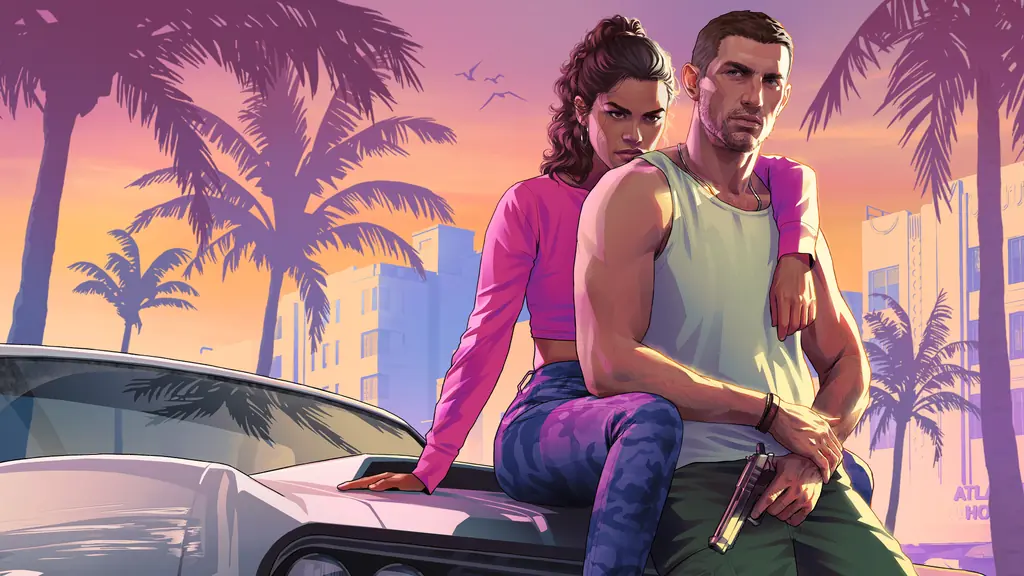
Grand Theft Auto VI artwork and logo: Rockstar Games.
A GTA 6 clip maker turns long GTA VI streams and console recordings into short vertical clips of the best moments. With OpenClip you paste a Twitch, Kick or YouTube VOD link or upload a PS5 or Xbox file, set Video type to Gaming, and get a scored shortlist of captioned 9:16 clips with your facecam above the game. It finds moments from what you say, so streams with commentary give the most clips.
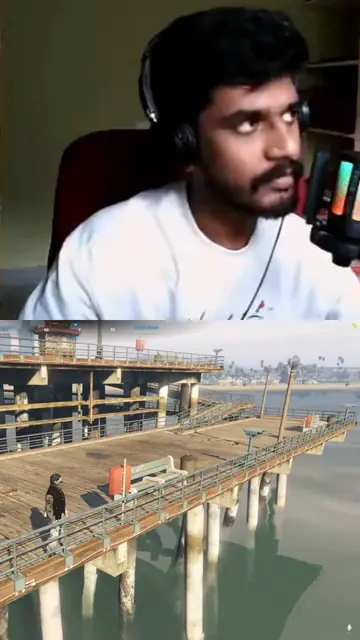
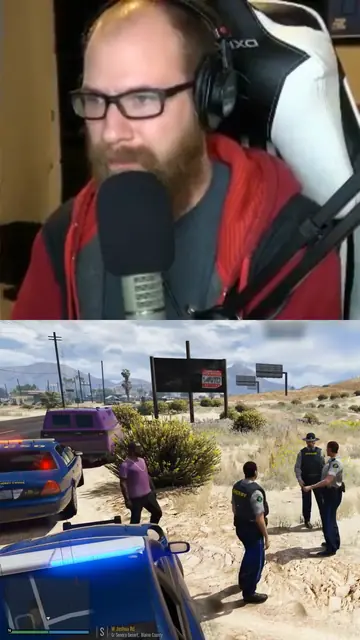
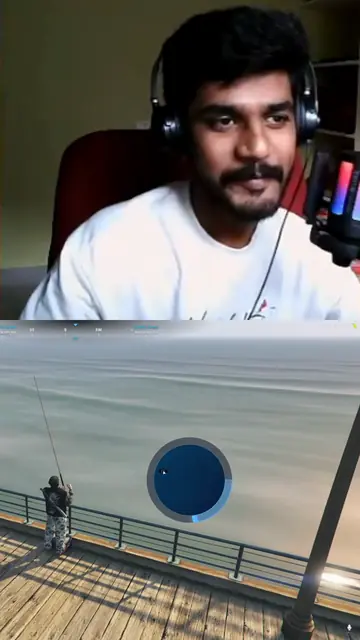
Facecam over gameplay
Frames from clips in the Facecam over gameplay layout: the streamer's camera on top, the game below. Pick it for your brand under Clip layout. We made these from GTA V streams, before GTA VI's 19 November 2026 release.
Scenario
GTA VI comes out on 19 November 2026 on PS5 and Xbox Series X|S, and launch streams will run six hours or more. Somewhere in that VOD are a chase that ends in a crash, a heist plan that falls apart and the moment you first drive through Vice City. Finding those minutes by scrubbing the VOD takes longer than the stream did, and Twitch deletes most past broadcasts within 7 to 60 days.
Workflow
Paste the VOD or upload the recording
Paste a Twitch past broadcast or clip, a Kick VOD or clip, or a YouTube video or live link at openclip.app/dashboard once the stream has ended. Or upload the file: PS5 WebM, Xbox and OBS recordings all work. To clip one part of a long stream, trim the submission to that window.
Set Video type to Gaming
Gaming puts reactions and action first, is tuned to avoid cutscenes and story reveals, and keeps clips at 30 to 60 seconds. Add clip guidance such as "my biggest reactions, skip cutscenes and loading screens".
Put your facecam above the game
In Brand settings, set Clip layout to Facecam over gameplay. Every clip then has your webcam on top and the game below. You set it once per brand.
Pick from the scored shortlist
OpenClip reads what you say and how loud each moment is, scores the candidates and renders the best ones as captioned 9:16 clips. Open a clip in the editor to trim it, change the caption style or fix a word.
Post while the game is new
Download the clips and post them to TikTok, YouTube Shorts and Instagram Reels. Listen first: a song on the in-game radio can get a clip claimed or muted.
Benefits
Key Metrics
30 to 60 s
Clip length with Video type set to Gaming
12 h
Longest upload or trimmed part
57
Caption presets
360
Credits for a 6 hour stream
Which GTA 6 footage can I clip?
Anything with your voice on it. Paste a Twitch past broadcast (twitch.tv/videos link) or a Twitch clip, a Kick VOD or Kick clip, or a YouTube video or youtube.com/live link once the stream has ended. A live channel link, a broadcast that is still live and a subscriber-only VOD cannot be fetched, and Twitch deletes past broadcasts after 7 to 60 days depending on the channel, so submit the VOD soon after you stream.
Console players upload the file. PS5 saves WebM by default, which OpenClip accepts, and Xbox recordings work as a file or a public OneDrive link. A whole Twitch or Kick link over about 5 hours must be trimmed before it is processed. Uploads and trimmed parts can run up to 12 hours. For getting the file off the console, see how to clip GTA 6 on PS5 and Xbox.
How does OpenClip pick GTA 6 highlights?
From what you say and how loud the moment gets. OpenClip transcribes the stream, measures the loudness of each moment and scores the candidates, so the highlights it returns are the places where you shout, laugh or explain a plan that is about to fail. Set Video type to Gaming and it puts reactions and action first, is tuned to avoid cutscenes and story reveals, and keeps clips at 30 to 60 seconds.
Clip guidance narrows it further, for example "police chases and crashes, skip menus and cutscenes". Guidance that points at one timestamp or one exact quote is refused as too narrow. Gameplay with no commentary can give few clips or none, because OpenClip has no detection that works from the picture alone. If you record on console, turn your mic on before you play.
How do I put my facecam above the gameplay?
Set Clip layout to Facecam over gameplay in your Brand settings. Every clip then has the webcam on top and the game below, and OpenClip also finds larger webcams and webcams set in from the edge of the frame. A clip with no webcam gets a steady center crop. The default, Auto, already stacks a webcam it finds at the edge of the frame, and Centered gameplay gives a steady crop of the game alone.
The layout applies to videos you process after you save it. When a car leaves the frame in a chase, open the clip in the editor and check the crop before you post.
How long should a GTA 6 clip be for TikTok, Shorts and Reels?
30 to 60 seconds for most launch clips, which is what Video type Gaming gives you. A chase or a heist needs the setup and the payoff in the same clip, so set Max clip length to 90 seconds when a scene runs long. For YouTube Shorts, keep clips to 60 seconds or less when the in-game radio is audible, because a claimed Short over one minute may be blocked. TikTok's Creator Rewards program pays only for videos of one minute or more, so a TikTok cut can run longer.
With a custom Max clip length from 15 to 90 seconds, every clip runs between half the cap and the cap. More on the platform rules in clipping on TikTok.
What does it cost to clip a GTA 6 stream?
OpenClip charges 1 credit per minute of source video, so a 6 hour launch stream costs 360 credits and a trimmed 2 hours costs 120. Starter includes 150 credits a month for $14.99, Pro 350 credits for $24.99 and Business 1,500 credits for $89.99. Trim the submission to the part you want and only that part is processed and charged.
A free 3-day trial gives 60 credits and needs a card, and clips made during the trial carry a watermark. The number of clips scales with the length of the video, so a longer stream gives you more to pick from. To compare per-minute and flat prices across tools, see the best GTA 6 clipping tools.
Can I clip someone else's GTA 6 stream?
Only with permission. The stream belongs to the streamer and the game footage to Rockstar, whose video policy is written for non-commercial fan videos. Most paid GTA 6 clipping runs through campaigns that name the streams you may clip, and they reject clips that are only a cutscene or a story reveal. See GTA 6 clipping for the campaigns, what they pay and the rules that get clips removed.
Can I make GTA 6 clips from Claude or ChatGPT?
Yes. OpenClip's MCP server lets Claude or ChatGPT submit a VOD link or a file, check on processing, list the moments and render the clips. Ask the assistant to set the content genre to gaming so clip picking is tuned for gameplay, the same as Video type Gaming in the app.
Features
Twitch, Kick and YouTube Links
Paste a past broadcast or a clip link after the stream ends, before the VOD expires
PS5 and Xbox Files
Upload PS5 WebM, Xbox and OBS recordings as they are, up to 12 hours
Gaming Video Type
Reactions and action first, tuned to avoid cutscenes, clips of 30 to 60 seconds
Facecam Over Gameplay
Your webcam on top and the game below on every clip, set once per brand
Word-Level Captions
57 caption presets keep shouted reactions readable with the sound off
Trim Before You Spend
Process only the hour you want instead of the whole launch stream
Frequently Asked Questions
Clip Your GTA VI Stream Tonight
Paste the VOD or upload the recording, set Video type to Gaming, and get captioned vertical clips of your biggest reactions.
Related Pages
Comparisons
OpenClip is not affiliated with, endorsed or sponsored by Rockstar Games or Take-Two Interactive. Grand Theft Auto, GTA and GTA VI are trademarks of Take-Two Interactive Software, Inc.