By Mees de Beukelaar
AI Captioning for TikTok, Reels, and Shorts
Captions are essential — AI tools make accurate, platform-optimized subtitles the fastest way to boost views and retention on short-form videos.
Originally published February 4, 2026

In this article
Captions are no longer optional for short-form videos. With 69% of viewers watching without sound, adding captions boosts engagement, accessibility, and even SEO. Videos with captions see 55.7% more impressions and an 80% increase in full views. AI tools now make captioning faster, syncing text to audio with up to 99% accuracy in minutes. These tools also add animations, emojis, and even predict viral potential, saving creators hours of editing.
Here’s what you need to know:
- TikTok: Keep captions within 150 characters per line, centered to avoid UI overlap. Use 3–5 hashtags for better reach.
- Instagram Reels: Place captions in the center third of the screen, use clean fonts, and aim for 138–150 characters in descriptions.
- YouTube Shorts: Limit captions to 70 characters per line and focus on the first 125 characters of the description for search visibility.
AI platforms like OpenClip streamline captioning, offering transcription, speaker detection, and clip optimization across platforms. With plans starting at $9/month, creators save time and improve video performance. Captions aren’t just about accessibility - they’re key to keeping viewers engaged and ensuring your content gets noticed.
Platform-Specific Captioning Guidelines
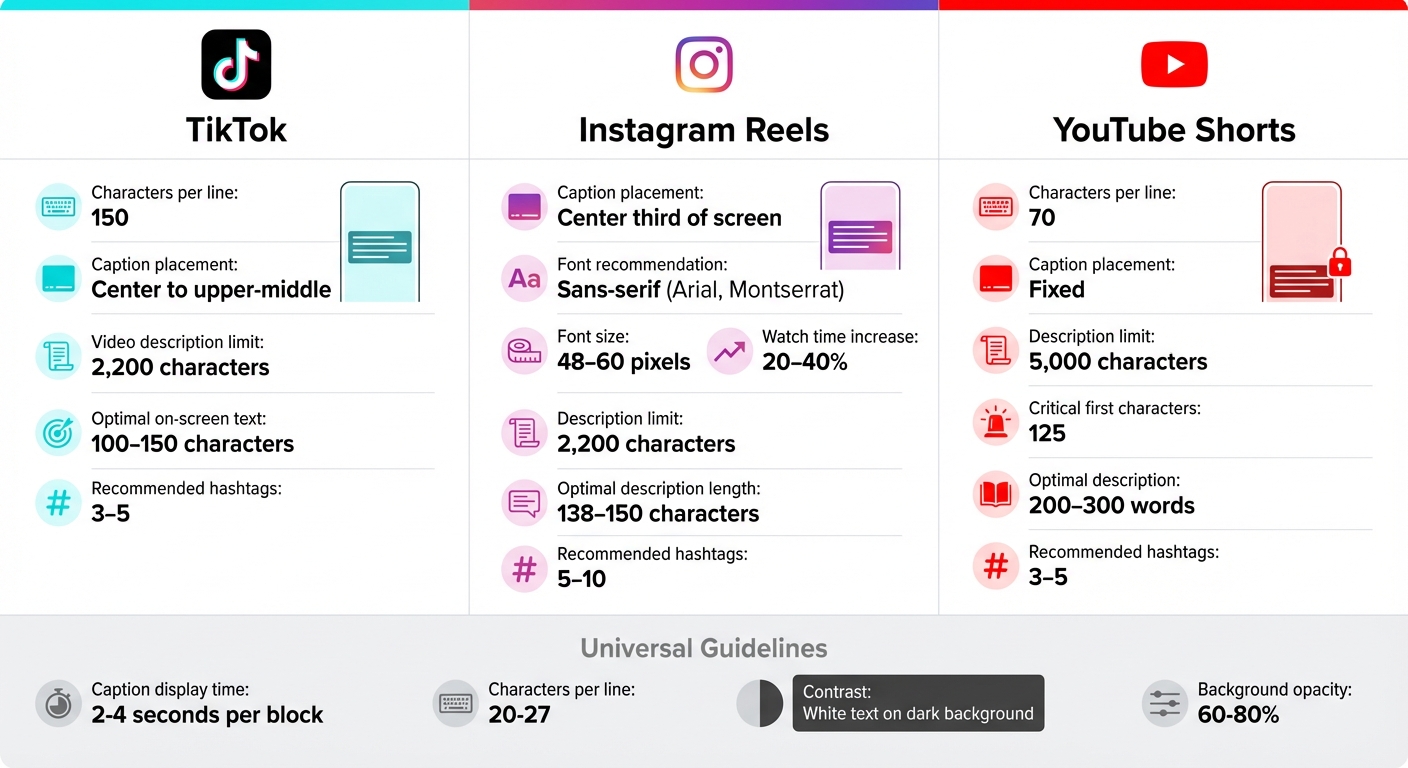
TikTok vs Instagram Reels vs YouTube Shorts Caption Requirements Comparison
Each social media platform has its own set of quirks when it comes to captions. By tailoring your AI-generated captions to these guidelines, you can enhance their effectiveness and improve your content's reach.
TikTok Caption Requirements
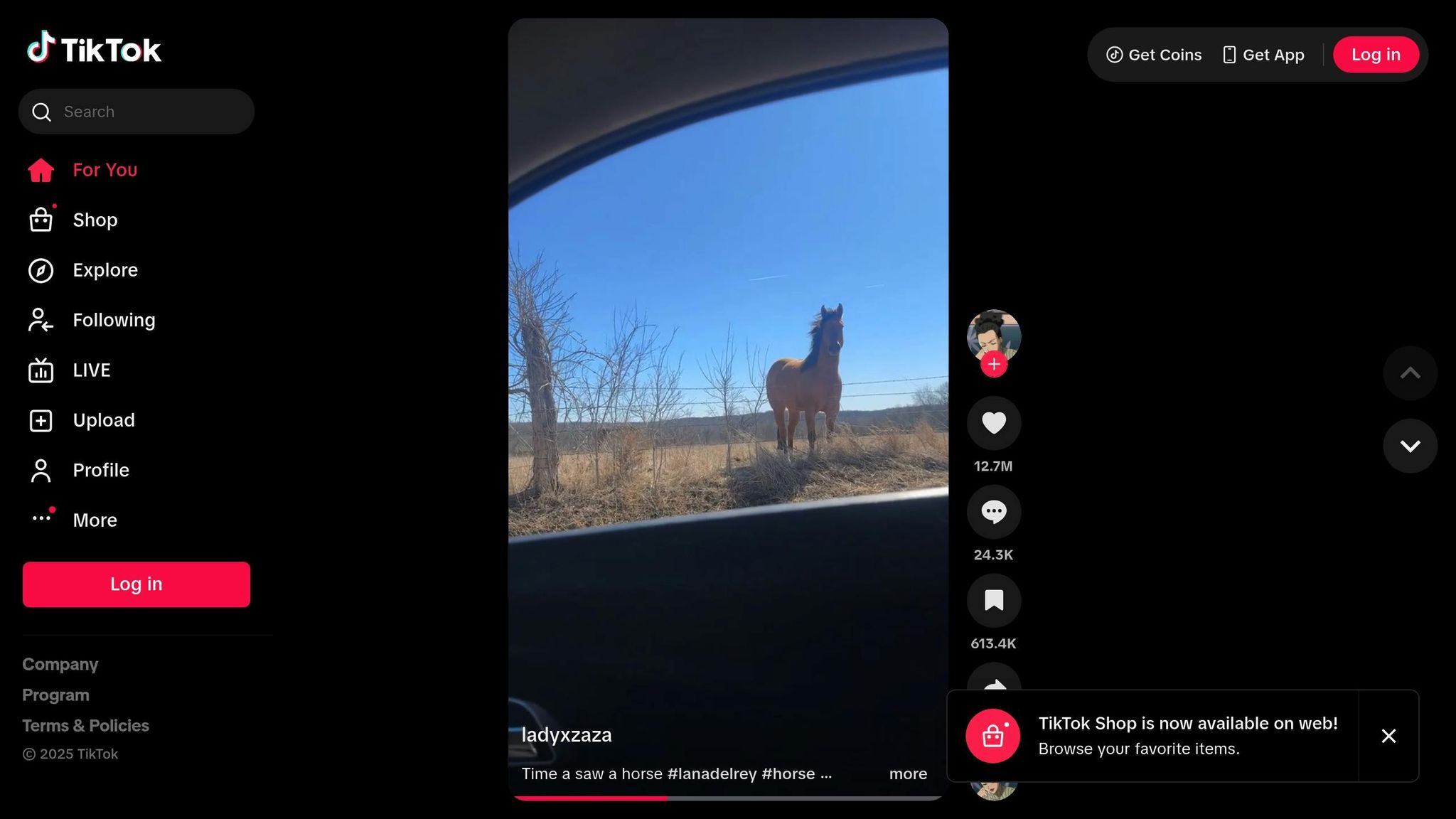
TikTok captions allow for 150 characters per line, and it’s best to position them in the center to upper-middle area of the screen to avoid overlapping with interface elements. For video descriptions, you have up to 2,200 characters to work with. Keep your on-screen text short and impactful, aiming for 100 to 150 characters for a strong hook. Adding 3 to 5 hashtags also helps boost discoverability. Since TikTok’s algorithm relies on captions to understand content, make every word count.
Instagram Reels Caption Requirements
For Instagram Reels, place captions within the center third of the screen to avoid interference from username tags, action buttons, and other interface elements. Use a clean, sans-serif font like Arial or Montserrat, and keep the font size between 48 and 60 pixels for readability. Including captions can increase average watch time by 20% to 40%. While Instagram descriptions can be up to 2,200 characters long, the sweet spot for engagement is 138 to 150 characters. Using 5 to 10 hashtags further boosts discoverability. Captions not only draw viewers in but also signal quality to Instagram’s algorithm.
YouTube Shorts Caption Requirements
YouTube Shorts captions are more restrictive, with a limit of 70 characters per line and fixed placement. Descriptions, on the other hand, allow up to 5,000 characters, but the first 125 characters are crucial for search visibility. To improve discoverability, aim for descriptions between 200 and 300 words and include 3 to 5 hashtags. A good strategy is to start with a detailed YouTube caption and condense it for TikTok and Instagram while keeping the core message intact.
"The key to effective caption design is finding the sweet spot between visual appeal and accessibility. When captions are both aesthetically pleasing and easy to read, viewer engagement significantly increases." - Platform Design Expert, YouTube Studio
Across all platforms, make sure individual caption blocks stay on screen for 2 to 4 seconds and keep lines between 20 to 27 characters to match natural speech pacing. Use high-contrast colors, like white text on a dark background, and consider adding a semi-transparent background box with 60% to 80% opacity to improve readability. Up next, we’ll explore strategies to create captions that captivate your audience.
How to Create Captions That Keep Viewers Watching
Now that you’ve got a handle on platform requirements, let’s dive into what makes captions truly stand out. Captions that keep viewers engaged rely on three key factors: readability, animation, and how well they align with your story.
Making Captions Easy to Read and Notice
The first step to effective captions is making sure they’re easy to read. Stick with clean, sans-serif fonts like Helvetica Neue, Open Sans, Roboto, or Montserrat. For mobile screens, font sizes between 18 and 24 points work best.
Contrast is just as important. White text on a black background delivers a strong 21:1 contrast ratio, while yellow text on black offers an 18:1 ratio. Follow platform guidelines for background opacity to ensure clarity.
Position captions in the lower third of the screen, leaving at least 60 pixels of space from the edges. Keep them within the middle 80% of the screen width to avoid cropping. For better readability, limit lines to 3–7 words (or 20–27 characters) to mimic natural speech patterns and reduce eye strain.
Captions should appear slightly ahead of the audio - by about 100 to 200 milliseconds - since reading is faster than listening. Once your captions are clear and readable, animation can take them to the next level.
Adding Animation and Highlights
After ensuring clarity, use animation to grab attention and emphasize key moments. Techniques like word-by-word highlighting or subtle color changes (e.g., white text transitioning to yellow) can emphasize important phrases. Match animations to your content’s tone - serious clips might use slower fade-ins (around 0.3 seconds), while upbeat content can benefit from quicker effects.
For extra impact, try punch-word scaling (enlarging key words to 60–80 points) or gentle “breathing” animations to add subtle movement without overwhelming viewers. Make sure each caption segment stays on screen for 1 to 3 seconds, giving viewers enough time to read without feeling rushed.
Aligning Captions with Your Story
Once your captions are clear and engaging, they should work seamlessly with your storytelling. Break text at natural pauses, using punctuation to maintain flow and rhythm. Match the pacing of your captions to the energy of your video - fast-paced clips can use quicker caption changes and dynamic positioning, while slower, educational content might benefit from steady, centered text.
Test your video with the sound off to ensure the captions alone deliver your message. Use emphasis techniques like bolding, color changes, or scaling sparingly to highlight key points without overwhelming the viewer.
Combining text and audio can increase comprehension by up to 56%, and adding emojis strategically can improve retention by 15% to 25% for lifestyle or entertainment content.
It’s worth noting that about 80% of TikTok users and 85% of Facebook viewers watch videos without sound. Captions aren’t just an optional feature - they’re often how viewers experience your content. Make every word count.
Automating Captions with AI Tools
Creating captions manually can be a tedious process, often taking hours to complete. AI-powered tools have flipped the script, cutting that time down to just minutes. And the best part? This leap in efficiency doesn’t come at the cost of quality. Modern AI tools now boast a Word Error Rate (WER) of ≤5%, delivering highly accurate results in mere seconds. By automating the captioning process, these tools have revolutionized how quickly content creators can produce polished, accessible videos.
Complete AI Captioning Workflow
Here’s how the automated captioning process works: start by uploading your video or simply pasting a YouTube or Vimeo URL. The AI gets to work, analyzing your content and generating perfectly synchronized captions with an accuracy rate of over 97%. It even identifies different speakers and handles technical jargon with ease.
Once the captions are ready, you can tweak them further - adjust text timing, add animated emojis, or highlight key phrases. The AI can also reformat your video to a vertical 9:16 aspect ratio, perfect for TikTok or Instagram Reels. Need to clean up your audio? You can remove verbal fillers like "um" and "uh" with a single click. For an extra touch, you can even add AI-generated B-roll based on text prompts. When it’s time to export, you have options: hard-coded MP4s for social media or SRT and VTT files for professional editing.
Using OpenClip for Captioning and Repurposing
OpenClip takes this streamlined workflow to the next level, helping you maximize your content’s reach. The platform automates transcription and makes it easy to distribute your content across multiple platforms. Upload a long-form video, and the AI will identify speakers, generate captions, and create short, optimized clips for TikTok, Instagram Reels, and YouTube Shorts. Each clip is even assigned a "virality score", so you know which ones are most likely to perform well.
Take podcaster Joshua W., for example. By using OpenClip to turn his long-form recordings into captioned clips, he saw a staggering 400% increase in engagement on his website and podcast. Similarly, public speaker Karl R. reported saving about $1,000 per month on production costs and reclaimed 10 hours of work time each week after switching from manual editing to OpenClip’s AI workflow.
"The engagement to my website and podcast is up 400%. I'm seeing numbers I didn't think were possible." - Joshua W., Podcaster
OpenClip supports over 30 languages and offers one-click scheduling for platforms like TikTok, YouTube Shorts, Instagram Reels, and LinkedIn. To maintain a cohesive look, you can save custom fonts, colors, and logos as brand presets, ensuring consistency across all your clips.
OpenClip Plans and Features
OpenClip offers three pricing tiers to suit different needs:
- Free Plan: Includes 30 minutes of processing per month and a single brand profile - ideal for testing the platform. Videos on this plan include a watermark [website].
- Pro Plan: Priced at $9 per month, this plan removes the watermark, increases processing to 180 minutes per month, and allows up to three brand profiles. You’ll also get priority queue access [website].
- Business Plan: For $29 per month, this plan offers 360 minutes of processing, unlimited brand profiles, team collaboration features, and top-priority queue access [website].
Content creator Myles M. used OpenClip to grow his TikTok following by 24%, all while saving 7–10 hours of editing per week. Automating a month’s worth of content - roughly 30 clips - now takes him just about an hour, compared to the days it used to require. The time savings alone make these tools a game-changer for creators looking to scale their output efficiently.
sbb-itb-5598afdTracking and Improving Caption Performance
The line between a video that fades into obscurity and one that goes viral often hinges on the quality of its captions. By keeping an eye on the right metrics, you can continually tweak and refine your caption strategy for better results.
Metrics to Track for Caption Performance
One of the most critical metrics to watch is your retention rate. This measures the average percentage of your video that viewers watch and serves as a key factor in how TikTok’s algorithm decides to distribute your content. Captions can boost retention by 12%, and videos with a 70% average watch time can earn up to 4.3 times more impressions compared to those with just 40% retention.
Another key metric is your completion rate, which tracks how many viewers stick around to watch your video in its entirety. This is especially important for platforms like TikTok and YouTube Shorts. Videos that are 21 to 34 seconds long tend to perform best, achieving an average completion rate of 62%. You should also be mindful of your rewatch rate - a signal that viewers find your content valuable enough to loop or revisit specific sections, which platforms’ algorithms love.
Each platform has its own unique signals. For example, YouTube Shorts places heavy emphasis on watch time, while Instagram Reels prioritizes saves and shares. Use your platform’s analytics tools to study retention graphs closely. If viewers drop off in the first three seconds, it could mean your hook isn’t strong enough. A decline around 8 to 10 seconds might indicate your content didn’t deliver on its initial promise. And since 60% to 70% of viewers consume short-form content without sound, captions are essential to keep their attention.
Once you’ve identified areas for improvement, start experimenting with different caption styles to find what resonates best with your audience.
Testing Different Caption Styles
A/B testing different caption styles can significantly boost engagement. Videos with captions are 94% more likely to be shared, and they can increase brand recall and engagement by 80%.
Try incorporating dynamic caption styles like the "karaoke bounce", where words light up as they’re spoken, or using bold highlights and smooth fades to keep viewers engaged. These visual elements act as “pattern interrupts,” refreshing the viewer’s focus. Changing text styles every three to five seconds can help hold attention and reduce drop-offs. If you’re targeting a global audience, consider testing translated captions in multiple languages. With modern AI tools supporting over 50 languages, this can expand your reach significantly.
As you experiment, monitor your analytics to see what works best. Some creators find that simple, clean captions outperform flashy, animated ones, while others see the opposite. For instance, pairing high-quality AI captions with compelling storytelling has led to a 50% spike in video engagement for some. Content creator James Bennett shared that his faceless TikTok channel saw its follower count double after he began using dynamic AI-generated captions.
These experiments will help you determine the ideal caption format for your videos.
Burned-In vs. Platform-Native Captions
Once you’ve nailed your caption style, the next step is deciding how to implement them: burned-in or platform-native captions. Each method has its own pros and cons, depending on your content goals and workflow.
Feature Burned-In Captions Platform-Native Captions Customization Full control over fonts, colors, and animations Limited to preset styles and colors Accuracy High (97–99% with AI tools) Moderate (80–85%) Speed Slower; requires external editing Instant; generated in-app Brand Alignment High; perfectly matches brand guidelines Low; often feels generic Repurposing Easy; captions stay with the video file Difficult; must be re-generated Accessibility Always visible; cannot be turned off Can be toggled on/off by the viewerBurned-in captions give you complete creative control, allowing you to customize fonts, colors, animations, and placement to align perfectly with your brand. They’re ideal for polished, branded, or educational content where precision matters. In fact, 85% of top-performing short-form videos use captions, and strategic captioning can boost watch time by 67% while tripling share rates.
On the other hand, platform-native captions are faster to implement and work well for casual content or when testing new ideas quickly. However, they offer limited customization and might miss specific terms or brand names. Some creators use a hybrid approach: burned-in captions for key phrases or hooks and native captions for the rest, ensuring complete transcription without overwhelming the screen.
Conclusion
AI-powered captioning tools have transformed the way creators approach short-form video content. What once took up to six hours can now be accomplished in just 20–30 minutes. This shift allows creators to focus more on crafting engaging content rather than getting bogged down in tedious editing. Considering that 85% of social media videos are viewed without sound, captions have become a non-negotiable feature for capturing the attention of viewers scrolling through TikTok, Reels, and Shorts in silent mode.
Captioned videos aren't just about accessibility - they deliver measurable results. They lead to 40% longer viewing times, increased engagement, a 30% rise in subtitle usage, a 12% boost in organic search rankings, and an 8% lift in click-through rates. To tap into these benefits, it’s crucial to use captioning tools that simplify the process.
One standout option is OpenClip. It automates transcription, speaker detection, and clip creation while achieving over 97% accuracy and supporting more than 30 languages. With plans starting at just $9/month and a free tier offering 30 minutes of processing each month, OpenClip makes professional-quality captioning accessible to creators of all sizes.
As creator Lewis Howes puts it:
"It used to take days to create clips. Now it takes us minutes to create them." - Lewis Howes, Creator
FAQs
How can AI captioning tools enhance video engagement on TikTok, Reels, and Shorts?
AI captioning tools enhance video engagement by automatically producing precise subtitles. These captions ensure viewers can follow along even without sound, making your content more accessible and appealing to a larger audience.
Subtitles also play a key role in improving SEO and discoverability. They help your videos reach a wider audience by making them easier to find online. Plus, captions keep viewers watching longer, which signals social media algorithms to boost your content, increasing its visibility and reach.
What are the main differences in captioning styles and requirements for TikTok, Instagram Reels, and YouTube Shorts?
TikTok captions allow up to 150 characters per line and can be customized with various fonts, animations, and placements to align with current trends. Since many users watch videos on mute, making captions visually bold and syncing them seamlessly with the audio is key to capturing attention in the fast-paced scrolling environment.
Instagram Reels captions can go up to 2,200 characters, but only the first 125 characters show in the preview. This means your most important information should appear at the beginning. Captions are displayed in a fixed lower-third position, with limited font styles, and creators often include emojis and hashtags to increase visibility and engagement.
YouTube Shorts captions are capped at about 70 characters per line and are fixed in the lower-third area with minimal font customization. To maximize impact, captions should be short, packed with relevant keywords, and perfectly timed to the spoken audio. This not only enhances accessibility but also boosts search visibility.
How does OpenClip make captioning easier for short-form video creators?
OpenClip takes the hassle out of adding captions to your short-form videos. With its AI-powered tools, it automatically transcribes audio, identifies speakers, and generates captions that are perfectly synced to your video. These captions not only enhance accessibility but also help grab attention and drive engagement.
On top of that, OpenClip saves you time by simplifying the entire process - from transcription to scheduling. It makes it easy to share your videos effortlessly across platforms like TikTok, Reels, and Shorts.
Turn one video into a week of content.
Try OpenClip free