By Mees de Beukelaar
How AI Transforms Long Videos into Social Media Clips
Turn long videos into platform-ready social clips using AI that auto-selects highlights, adds captions, reformats, and schedules posts in minutes.
Originally published January 20, 2026
In this article
AI tools simplify turning long videos into short, engaging social media clips. They automatically identify key moments, reformat content for platforms like TikTok and Instagram, and add captions - all in minutes.
Here’s what they do:
- Save time: Reduce production time by up to 90%, creating 15–20 clips from a 60-minute video.
- Automate tasks: AI handles transcription, clip selection, vertical formatting, and filler word removal.
- Boost engagement: Captions (with 97%+ accuracy) and platform-specific adjustments increase viewer interaction.
- Streamline publishing: Tools like OpenClip allow direct scheduling to multiple platforms.
AI eliminates the tedious parts of editing, letting you focus on creating content while maintaining control over branding and style.
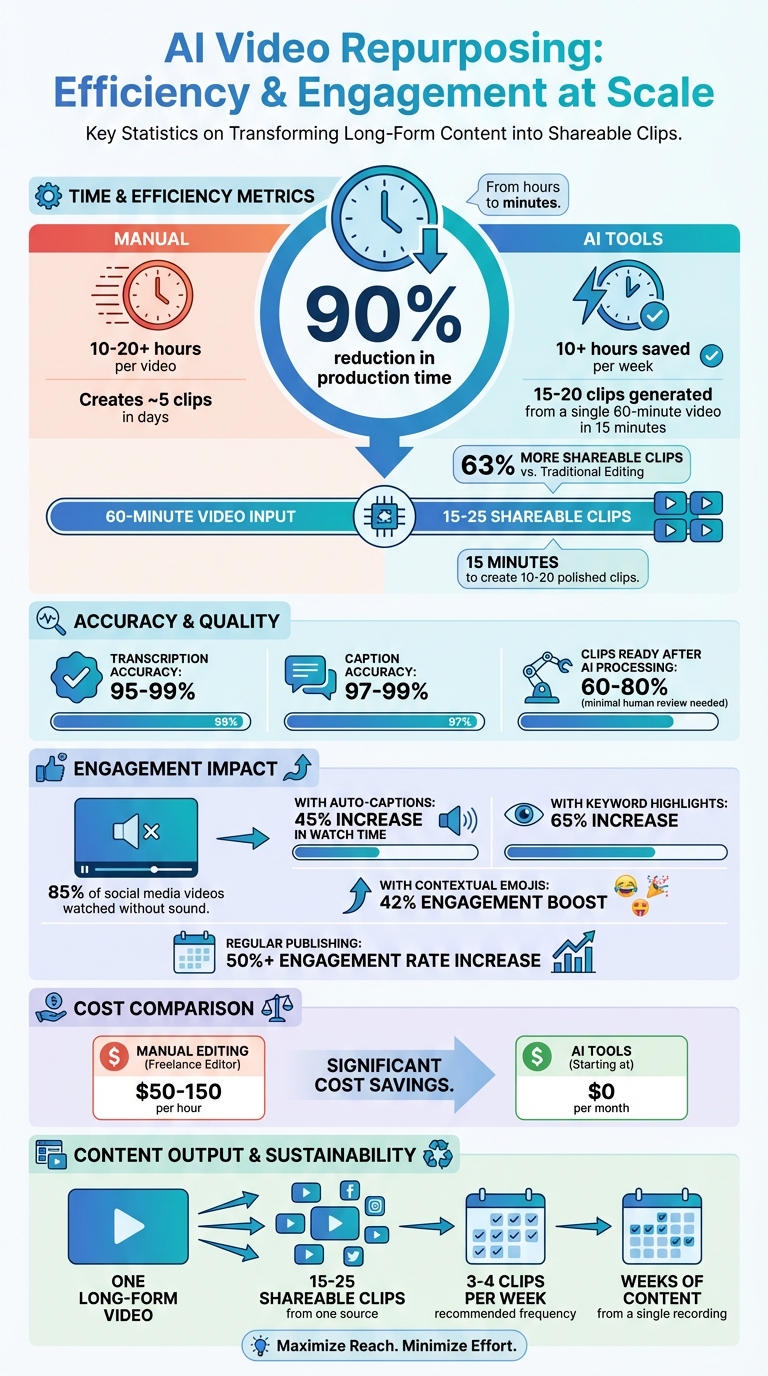
AI Video Repurposing: Time Savings and Performance Statistics
Repurposing Video Content Into Multiple Mediums with AI Tools
What is AI Video Repurposing?
AI video repurposing is all about taking long-form videos - like podcasts, webinars, or lectures - and automatically breaking them down into short, attention-grabbing clips that are ready to post on platforms like TikTok, Reels, or LinkedIn. Using tools powered by AI, this process identifies the most engaging moments by analyzing speech, context, emotions, and topic changes. The result? Clips that are primed to connect with your audience.
For example, a single 60-minute video can be transformed into 10 to 20 shareable clips, giving you weeks of content from just one recording. This approach not only saves time but also maximizes the value of your original video by turning it into multiple pieces of content.
AI tools go beyond just selecting clips. They can reformat videos for mobile screens, focus on active speakers, and even add animated captions with impressive accuracy - up to 99%. With text-based editing features, you can refine your video directly through the transcript, skipping the hassle of scrubbing through timelines.
The impact? Huge. AI can cut video production time by up to 90% and save creators over 10 hours per week by automating tasks like clip selection and scheduling. On top of that, AI-driven tools can generate 63% more shareable clips compared to traditional editing methods.
Common Problems with Manual Video Editing
Editing videos manually for social media is no walk in the park. Imagine sitting through an hour-long webinar just to find those golden 30- to 60-second moments. It’s a slow, tedious process - and that’s before you even start trimming, resizing, or adding captions. Traditional editing tools aren’t built for the fast-paced demands of social media, making the entire process feel like a slog.
The challenge gets even bigger when you need to format content for multiple platforms. Manually cropping for mobile, tracking speakers, and creating captions can eat up hours. And if you’re working on a tight schedule, hiring a freelance editor isn’t always an option - it can cost anywhere from $50 to $150 per hour. For creators who need to churn out content regularly, this just isn’t practical.
How AI Automates the Editing Process
This is where AI steps in to save the day. By automating the most time-consuming parts of the editing process, AI completely changes the game. Upload your long-form video, and the AI gets to work, analyzing the conversation to find the moments with the strongest hooks, emotional highlights, or thought-provoking insights - perfect for social media.
Some tools, like OpenClip, even assign a "virality score" to clips, helping you pick the ones most likely to resonate with your audience. The AI doesn’t stop there - it automatically formats your clips for different platforms and adds captions, so your content is ready to go.
One standout feature is text-based editing. Instead of scrubbing through a timeline, you can quickly tweak your video using an auto-generated transcript. Need to clean up filler words like "umm" or "ahh"? Many tools let you remove them with a single click, making your clips polished and engaging.
The entire process, which used to take hours, now takes just minutes. Upload your video, review the clips chosen by the AI, make any final tweaks, and schedule them for posting - all from one dashboard. Platforms like OpenClip even let you auto-publish directly to TikTok, Reels, Shorts, X, and LinkedIn, streamlining your workflow even further.
With these tools, turning raw footage into scroll-stopping content has never been easier. It’s a game-changer for creators looking to save time while producing high-quality, engaging clips. AI-driven video repurposing is all about efficiency, letting you focus on creating rather than editing.
How AI Finds the Best Moments in Your Videos
AI video repurposing kicks off with speech-to-text transcription. This step converts your video's audio into text, enabling the AI to use Natural Language Processing (NLP) to understand context, nuances, and connections. It pinpoints standout moments like bold statements, intriguing questions, or actionable insights - those elements that grab attention instantly.
Modern transcription tools powered by AI boast an impressive accuracy rate of 95% or higher. This high level of precision ensures the system can effectively analyze your content. Once the AI processes the transcription, it assigns a confidence-based virality score. This score is determined by evaluating factors like the strength of hooks, the popularity of topics, and engagement trends, helping the system prioritize the most impactful moments. This groundwork paves the way for the AI to pick up on both visual and emotional elements in your footage.
Scene and Emotion Detection
After analyzing the text, the AI shifts its focus to tone and visuals. By examining changes in tone, volume, and speech pace, it identifies emotional highs and lows. These emotional peaks are precisely what make viewers pause to engage with your content.
"It captures moments that make viewers lean in, laugh, or experience sudden realizations." - Klap
The system also leverages visual intelligence to analyze on-screen activity. For example, active speaker detection ensures the AI knows who’s talking in multi-person settings like podcasts or interviews. It even reframes horizontal footage into vertical formats, keeping the speaker centered for mobile-friendly videos. This automated adjustment makes your content look polished and professional without requiring manual edits.
Removing Filler Words and Silence
To refine the clips further, AI tools streamline the footage by cutting out unnecessary pauses and filler words. This ensures the final product maintains a smooth, engaging flow. By automating this process, you can save 10+ hours per week that would otherwise be spent on manual editing.
The polished result is a professional, concise clip - even if the original recording had rough patches. Considering that 85% of social media videos are watched without sound, these automated edits ensure your content remains impactful, whether viewers are listening or just reading captions.
Formatting Clips for Different Social Media Platforms
Once AI identifies the most impactful moments, the next step is tailoring these clips to fit the specific requirements of different social media platforms. Each platform has its own technical standards, and failing to meet these can limit your content’s reach. Thankfully, AI takes care of the technical adjustments - aspect ratios, resolutions, and export settings - ensuring your videos look polished and professional across all platforms.
Platform-Specific Formats and Export Settings
AI tools come equipped with pre-designed templates that align with the specifications of each platform. For instance:
- TikTok, Instagram Reels, and YouTube Shorts require a 9:16 vertical format with a resolution of 1080 x 1920 pixels.
- LinkedIn and X (formerly Twitter) perform best with 16:9 horizontal videos.
- Instagram feed posts often look great in a 1:1 square format.
To make these transitions seamless, AI uses advanced features like object tracking to keep faces and moving subjects centered when converting horizontal footage into vertical formats. For multi-person setups, such as podcasts or interviews, active speaker detection ensures the focus dynamically shifts to whoever is speaking at the moment.
"Smart reframe outputs 9:16, 1:1 and 16:9 while keeping faces centred and captions in safe zones." - OpenClip
Another critical consideration is safe zone awareness. This ensures that key elements - like faces, text, and captions - remain visible and aren’t obscured by platform-specific UI elements, such as like buttons or video descriptions. By paying attention to these details, your clips feel purpose-built for each platform rather than appearing as generic, auto-cropped content. Once the visuals are perfectly formatted, it’s time to focus on captions to make your message accessible, even without sound.
Automatic Captions and Subtitles
With 85% of social media videos being watched without sound, captions are no longer optional - they’re essential. AI uses its transcription capabilities to generate subtitles with an impressive 97%-99% accuracy. What once took 30 to 60 minutes can now be completed in just 2-3 minutes.
Adding captions doesn’t just improve accessibility - it can also significantly boost engagement. Auto-generated captions have been shown to increase watch time by 45%, while keyword highlights can drive that number up to 65%. Even small touches, like adding contextual emojis, can further enhance engagement by 42%.
Many AI systems also offer keyword highlighting, drawing attention to the most important words in a sentence. For creators looking to expand their audience, some tools can translate captions into over 100 languages, making it easier to connect with a global audience.
sbb-itb-5598afdWhat to Look for in AI Video Repurposing Tools
AI video tools aren’t all created equal. The difference between a smooth, time-saving workflow and a frustrating, clunky experience often comes down to a few key features. When evaluating your options, focus on tools that help you create high-quality clips quickly and consistently.
Automatic Clip Selection and Transcription
A strong AI video repurposing tool starts with accurate transcription - ideally at least 95% accuracy. This level of precision minimizes the need for manual corrections, saving you hours of work. Transcriptions also enable the AI to analyze your video’s content using semantic and sentiment analysis, helping it identify emotional highs, bold statements, and engaging questions - perfect for generating attention-grabbing clips.
Look for tools that go beyond transcription by offering features like virality scoring, which ranks clips based on their hook strength and potential to engage viewers. This can get your clips 60–80% ready, requiring only a quick human review to finalize.
Other must-have features include active speaker detection and keyword-based search. These allow you to quickly pinpoint key moments in your video. Once you’ve identified the best clips, the next step is making sure they reflect your brand’s unique style.
Branding and Customization Features
After selecting your clips, it’s time to make them your own. Consistent branding transforms simple clips into recognizable assets for your audience. Seek tools that let you create reusable templates, complete with your logos, fonts, and color schemes. For instance, OpenClip lets users set up multiple brand profiles, so each clip automatically aligns with your visual identity.
Customization doesn’t stop at branding. Look for features like animated captions, keyword highlighting, and even emoji integration to enhance the viewer experience. Tools that let you remove filler words and silences with a single click can also tighten your clip’s pacing and keep audiences engaged.
For teams juggling multiple clients or brands, collaboration features and the ability to switch between brand profiles are essential. These tools help scale your production process without compromising quality. Once your clips are branded and polished, the next focus is getting them in front of the right audience.
Scheduling and Multi-Platform Publishing
Direct scheduling to platforms like TikTok, Instagram Reels, YouTube Shorts, X, and LinkedIn can save you the hassle of manual uploads. Regularly publishing content can boost engagement rates by over 50% on platforms like Instagram.
"The real power of an AI clip generator is its ability to multiply your presence without multiplying your effort." – Klap Blog
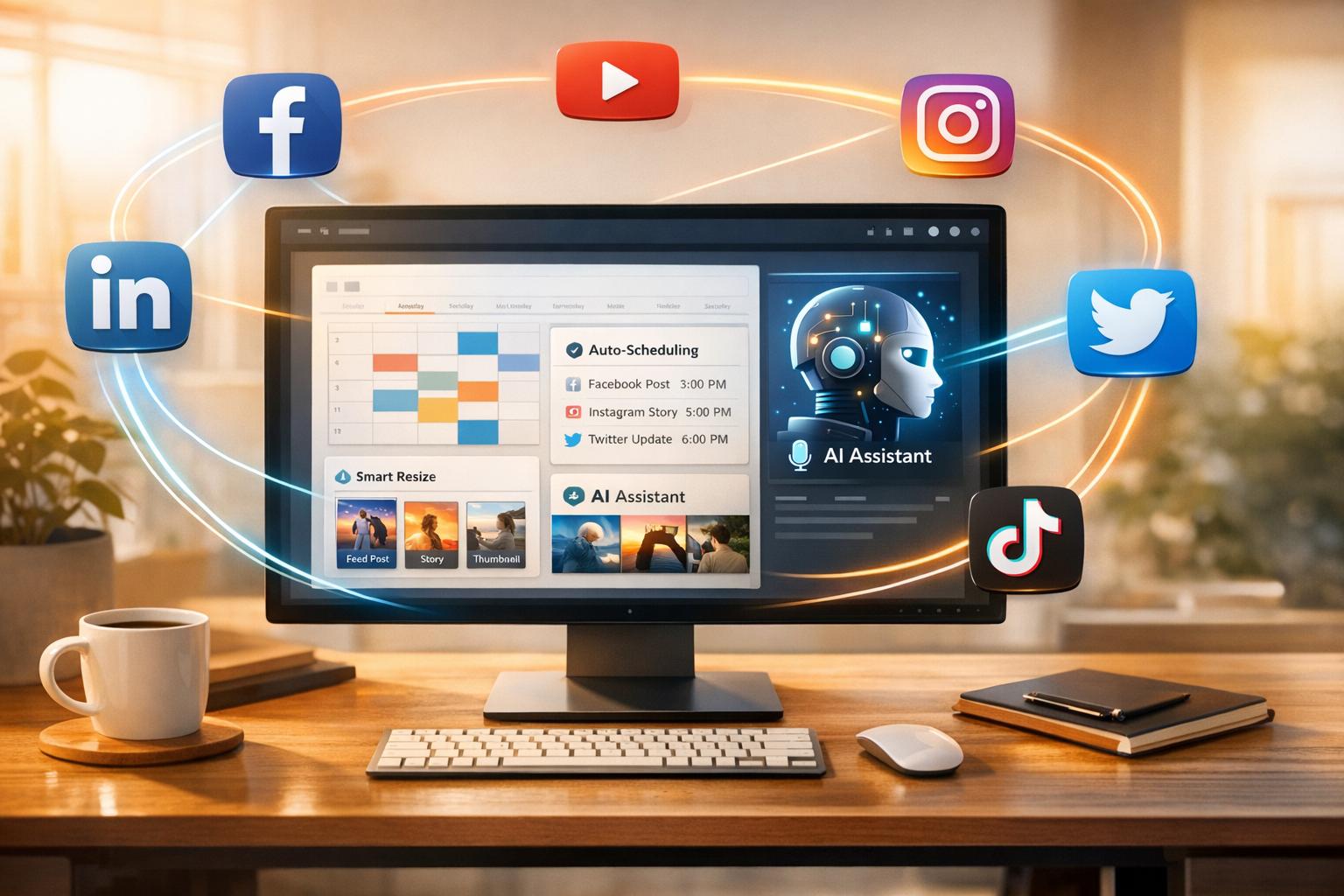
Auto-scheduling tools allow you to queue up an entire week’s worth of content from a single dashboard, ensuring your posts go live at the best times. This not only streamlines your workflow but also helps you stay consistent, even when deadlines are tight.
Step-by-Step Guide to Repurposing Videos with AI
Transform long-form videos into bite-sized, social-ready clips using AI. By leveraging AI's ability to pinpoint key moments, you can efficiently create engaging content in three simple steps: upload, refine, and schedule.
Upload Your Video and Let AI Work Its Magic
Start by uploading your video file (MP4) or sharing a link from platforms like YouTube, Zoom, or Vimeo. Once uploaded, the AI takes over - transcribing, detecting speakers, and picking out highlights.
The AI scans your video for attention-grabbing moments, such as emotional peaks, bold statements, or surprising insights. It assigns each clip a "virality score", helping you identify the most shareable content. Plus, it automatically adjusts horizontal footage into vertical (9:16) or square (1:1) formats, keeping the active speaker centered. For a typical hour-long video, expect 15–20 suggested clips, each about 60–80% ready for publishing. Your job? Review the suggestions and select the ones that align with your brand's tone and goals.
Once you've chosen your clips, it's time to add your unique branding touch.
Add Your Branding and Final Touches
Consistency is key, and OpenClip makes it easy to apply your brand's visual identity. Set up brand profiles with your logos, color schemes, and fonts, so every clip automatically reflects your style.
Fine-tune your clips with text-based editing. You can trim content by deleting unnecessary words directly from the transcript - no need to scrub through the timeline. Remove filler words like "um" and "uh" with a single click to improve pacing. Boost engagement by adding dynamic captions, keyword highlights, and even emojis.
Make sure each clip starts strong. The first three seconds should grab attention with a bold statement or an intriguing fact. Wrap it up with a clear call-to-action, like "Follow for more" or a link to the full video, to turn casual viewers into loyal followers.
Schedule and Share Your Clips
Once your clips are polished, it's time to share them. Connect your social media accounts directly in OpenClip - platforms like TikTok, Instagram Reels, YouTube Shorts, LinkedIn, and X integrate seamlessly. Use the built-in content calendar to plan your posts, spacing them out for maximum impact instead of posting everything at once.
A good strategy is to post 3–4 clips per week from a single long-form video. This keeps your content fresh and maintains visibility in social media algorithms without overwhelming your audience. OpenClip's auto-scheduling feature takes care of publishing at the right times, so you don't have to.
For even better results, try A/B testing different hooks or captions to see what resonates most with your audience before finalizing your schedule.
Conclusion
AI-powered video repurposing can turn a 60-minute video into 10–20 polished clips in less than 15 minutes, cutting production time by as much as 90% and freeing up over 10 hours every week.
With tools like OpenClip, tasks such as transcription, speaker detection, vertical reframing, filler word removal, and multi-platform scheduling are automated. This allows you to spend your time on what matters most - reviewing clips, adding your brand’s unique touch, and deciding which content to publish.
The impact? Better content performance and increased engagement:
"The real power of an AI clip generator is its ability to multiply your presence without multiplying your effort."
– Victor, Klap
For example, a single long-form video can generate 15–25 shareable clips, boosting engagement by over 50% on platforms like Instagram. It’s a simple way to keep your audience engaged for weeks, all while saving time and energy.
Why stick with manual edits? Try OpenClip today - starting at $0 per month - and focus on growing your audience while your content strategy works smarter, not harder.
FAQs
How does AI identify the best moments in a video for social media?
AI breaks down videos into essential elements like speech, visuals, and audio to figure out which moments are most likely to grab attention - what some call "hook potential."
It starts with automatic transcription and speaker detection, analyzing shifts in tone, pauses, or emphasis that often signal engaging moments. Then, computer vision comes into play, scanning for visual cues like facial expressions, movement, or scene transitions. Meanwhile, audio analysis picks up on spikes in sound, music, or special effects. All this data is fed into a trained neural network, which scores different segments based on their ability to capture attention.
The highest-scoring clips are then optimized for platforms like TikTok, Reels, Shorts, X, and LinkedIn, giving creators ready-to-share content designed to stop the scroll.
How does AI make editing long videos for social media easier?
AI has transformed video editing by taking over tasks that used to consume hours of manual effort. It can scan an entire video, pick out the key moments, identify who’s speaking, and even produce precise transcripts - all in just a matter of minutes. This not only speeds up the process but also ensures consistent results without the hassle of combing through endless footage.
Beyond that, AI makes it easier to tailor videos for social media platforms. It can adjust aspect ratios (like 9:16 for TikTok or 1:1 for Instagram), add captions, and even recommend hooks to grab attention. These smart tools are perfect for creating content optimized for platforms like TikTok, Reels, Shorts, X, and LinkedIn. Tools like OpenClip allow creators to save time, maintain high-quality standards, and expand their reach across different audiences with minimal effort.
How does AI help turn long videos into social media-friendly clips?
AI tools like OpenClip simplify the process of turning long-form videos into short, captivating clips designed for platforms like TikTok, Instagram Reels, YouTube Shorts, X, and LinkedIn. These tools handle tasks like transcribing videos, identifying speakers, and pinpointing the most engaging moments, ensuring your content connects with viewers effectively.
With features such as automatic captioning, smart reframing for various aspect ratios, and filler word removal, the final clips are polished, visually appealing, and crafted to grab attention. On top of that, the option to schedule posts across multiple platforms ensures your content gets in front of the right audience at just the right time, all without extra hassle.
By automating the editing and scheduling process, AI-powered tools save creators significant time and effort. This not only makes it easier to post more frequently but also helps boost the quality of your content, leading to increased likes, shares, and comments.
Turn one video into a week of content.
Try OpenClip free