By Mees de Beukelaar
Checklist for Optimizing Video Length by Platform
Platform-by-platform guide to ideal video lengths, first-3-second hooks, captions, and repurposing tips for TikTok, Reels, Shorts, X, and LinkedIn.
Originally published March 6, 2026
In this article
Getting your video length right is critical for standing out on social media. Different platforms prioritize different metrics, like completion rate or total watch time, meaning the ideal length varies based on where you’re posting. Here’s a quick guide:
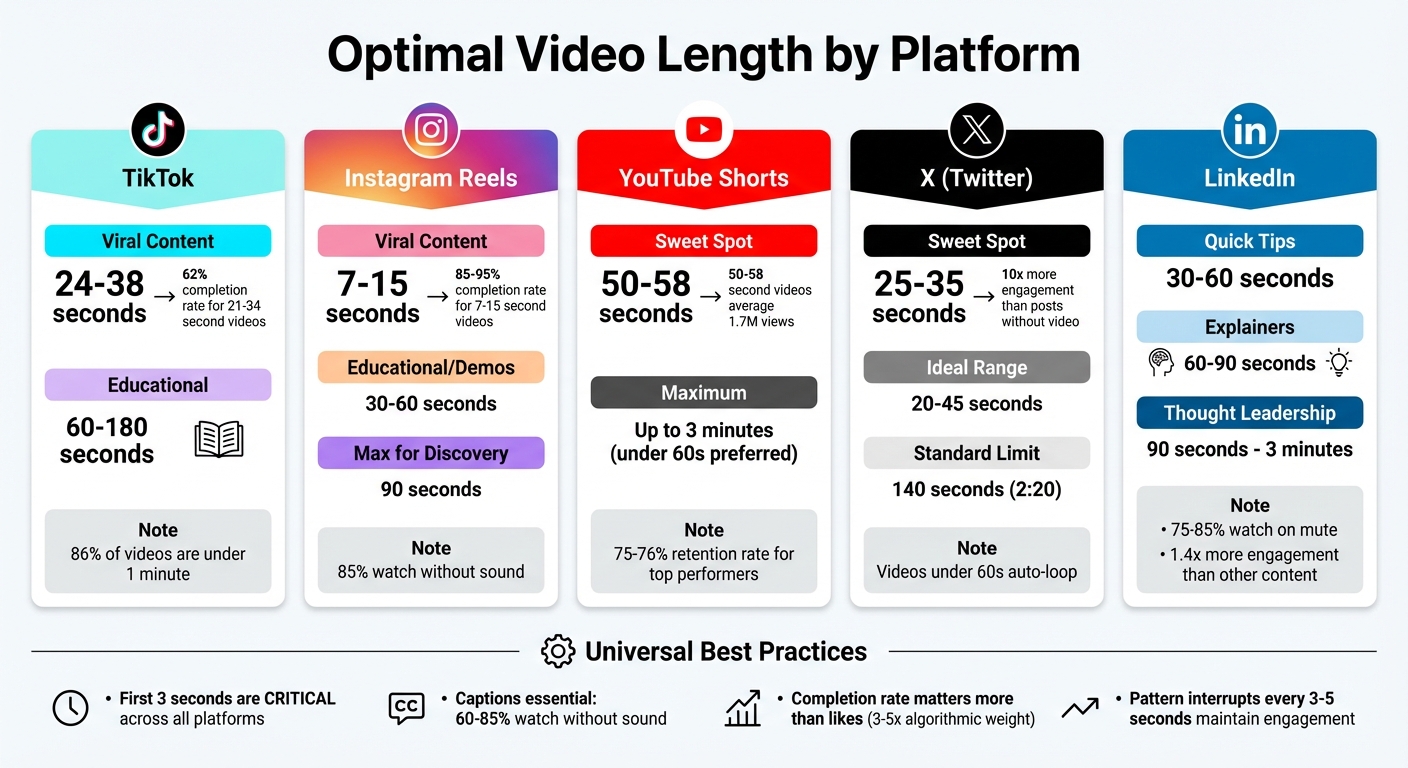
- TikTok: Viral videos perform best at 24–38 seconds, though educational content can go up to 60–180 seconds.
- Instagram Reels: Stick to 7–15 seconds for viral reach. Videos over 90 seconds won’t appear on the Discovery page.
- YouTube Shorts: Aim for 50–58 seconds - this range averages higher views and retention.
- X (Twitter): Short and snappy works best. 25–35 seconds is the sweet spot.
- LinkedIn: Videos between 30–90 seconds get higher engagement, though longer videos can work for in-depth content.
Across platforms, the first 3 seconds are crucial for grabbing attention, and captions are essential since many users watch without sound. Tailor your video length and structure to match each platform’s preferences to boost engagement and reach.
Optimal Video Length Guide by Social Media Platform
TikTok Video Length Checklist
Best Video Lengths for TikTok
TikTok's algorithm rewards videos that hold viewers' attention all the way through. While 86% of TikTok videos are under one minute long, the platform allows creators to record videos up to 10 minutes in-app and upload videos as long as 60 minutes.
The ideal video length depends on your content goals. For viral hits, aim for 24–38 seconds - this range strikes a balance between storytelling and viewer retention. Shorter clips, around 15–30 seconds, tend to drive more engagement and shares. If you're creating educational content, 30–60 seconds works well, while storytelling or in-depth topics can stretch to 60–180 seconds if the pacing keeps viewers hooked.
"The 24–38 second range is long enough to tell a complete story (Hook, Value, Payoff) but short enough to encourage high completion rates." – Joyspace.ai
Even though TikTok supports longer videos, those between 21 and 34 seconds perform best, achieving 62% completion rates compared to just 48% for videos over 60 seconds. Interestingly, longer videos (over 60 seconds) generate 43.2% more reach and 63.8% more watch time than videos in the 30–60 second range. Since the algorithm prioritizes completion rates, every second matters.
TikTok Video Optimization Tips
Choosing the right video length is just one piece of the puzzle. How you structure your content can make or break its success. The first three seconds are crucial - over 63% of top-performing videos convey their main message within this window. Avoid starting with generic intros like "Hey guys", which often lead to drop-offs. Instead, kick things off with a bold visual or striking statement to grab attention right away.
Keep the pacing dynamic. Use pattern interrupts every 3 to 5 seconds - such as switching angles, adding text overlays, or cutting to B-roll - to re-engage viewers. For videos lasting over 30 seconds, insert a secondary hook around the 15- and 30-second marks to combat attention dips. Aim for a speaking rate of 140–160 words per minute to maintain energy while staying clear. Since 60% to 70% of viewers watch TikTok without sound, captions or text overlays are critical for holding their attention.
sbb-itb-5598afdInstagram Reels Video Length Checklist
Best Video Lengths for Reels
Instagram Reels, much like TikTok videos, work best within specific timeframes, but their limits are a bit different. While Reels can technically run up to 15–20 minutes, anything longer than 90 seconds won't appear on the Discovery page for non-followers. This restriction is crucial for boosting your reach. As Adam Mosseri, Instagram's Head, explained:
"Reels over 90 seconds long won't appear to non‐followers on the Discovery page".
If you're aiming for viral success, 7–15 seconds is the sweet spot. Reels within this range often achieve completion rates as high as 85% to 95%. For educational content or quick demos, 30–60 seconds is ideal for delivering value without losing attention. Storytelling or tutorials can stretch to 60–90 seconds, but be aware that longer videos tend to see lower completion rates, typically around 50%–70%.
In early 2025, Instagram extended the upload limit to 3 minutes. Mosseri commented:
"We're hoping that upping that limit up to three minutes will help you tell the stories that you really want to tell".
However, keep in mind that longer videos behave more like standard posts and have reduced chances of going viral. On average, viewers decide whether to scroll past a Reel within the first 3 seconds. To capture attention and hold it, use the 3/8/12 structure: a 3-second hook, 8 seconds of engaging content, and a 12-second call-to-action, making a total of 23 seconds.
Optimizing for Silent Viewing
Video length is important, but so is making your content accessible for silent viewers. A whopping 85% of users watch videos without sound, so captions are a must. Place text overlays in the upper two-thirds of your frame to avoid interference from Instagram's UI at the bottom. Keep overlays visible for 1–2 seconds to ensure they're easy to read and match the pacing.
For looping videos under 10 seconds, pair them with longer, engaging captions. This strategy encourages viewers to rewatch the video while reading, increasing both watch time and retention. Always film in 9:16 vertical format (1080 x 1920 pixels) to fully utilize the screen space. Avoid letterboxing or using videos with watermarks from other platforms, as these are penalized by Instagram's algorithm. To keep things dynamic, introduce a visual or audio change every 1.5 to 3 seconds, which helps maintain viewer interest and prevents fatigue.
YouTube Shorts Video Length Checklist
Best Length for YouTube Shorts
YouTube Shorts now allow videos up to 3 minutes long, but the algorithm tends to favor those under 60 seconds. To maximize your reach, aim for a sweet spot of 50–58 seconds. This duration not only ensures better watch time but also keeps you within the 60-second limit, which is key for music usage and optimal indexing in the Shorts feed.
Interestingly, Shorts in the 50–60-second range average about 1.7 million views - more than 22 times the views of clips under 10 seconds. Rene Ritchie, YouTube's Creator Liaison, sums it up perfectly:
"How long should a Short be? The answer is the same as for any video; as long as it needs to be, but no longer. As short as it can be, but no shorter."
For better engagement, focus on creating tightly edited videos with rapid cuts and no wasted moments, especially in the first 3 seconds. Why? Because 50–60% of viewers drop off in that initial window. Just like TikTok, dynamic edits are critical for keeping viewers hooked. Top-performing Shorts often maintain retention rates of around 75–76%, while less engaging ones dip below 50%. To boost your chances of algorithmic promotion, aim for a "Viewed vs. Swiped Away" ratio of at least 70%.
Next, let’s dive into how you can turn longer videos into optimized Shorts.
Repurposing Longer Videos for Shorts
If you’re working with long-form content, don’t just crop your video and call it a day. Instead, use YouTube Studio analytics to identify retention spikes - these high-engagement moments are your "golden nuggets" for creating Shorts. Each clip should stand alone as a complete, engaging piece.
Tools like OpenClip can simplify this process. OpenClip automatically scans your long-form videos, removes silences and filler words, and trims segments to fit the ideal time range. For example, it can turn a rambling 70-second segment into a tight, 55-second Short. AI-powered tools like this can also reframe videos to the 9:16 aspect ratio (1080×1920) and add burned-in captions, which are proven to enhance mobile engagement and increase watch time by up to 45%.
When adding text, keep it within the center 80% of the frame to avoid interference from YouTube's on-screen elements like buttons and captions.
These strategies can help you create Shorts that are not only engaging but also optimized for YouTube's algorithm.
X (Formerly Twitter) Video Length Checklist
Best Video Length for X
X thrives on speed, and your videos should keep up. The ideal length for maximum engagement falls between 20–45 seconds, with the sweet spot landing in the 25–35 second range. For standard (non-premium) accounts, videos are capped at 140 seconds (2 minutes and 20 seconds).
Videos under 60 seconds automatically loop, which can help increase view counts and boost engagement. On average, video completion rates hover around 41%.
Here’s another compelling stat: tweets with video generate 10 times more engagement than those without, and users watch 2 billion videos on X every day. To grab attention instantly, use motion like a cut, zoom, or gesture in the first second, paired with a quick, 6–8 word on-screen message. Also, ensure your logo or product appears within the first 3 seconds to reinforce your branding.
Once you’ve nailed the ideal video length, the next step is crafting content that thrives in X’s fast-moving environment.
Driving Engagement Through Video
X’s text-heavy culture means your video should deliver one clear and concise point - whether it’s a news update, a surprising fact, or a bold opinion. As InstantViews explains:
"Twitter users are scanning for information quickly. Videos need to deliver one clear point fast, matching the text-based culture of the platform."
– InstantViews
Because videos autoplay on mute, captions and text overlays are essential. Pairing video with text improves clarity and boosts viewer recall by 13%. For the Video Tab discovery feed, vertical 9:16 framing (1080×1920) works best to fill the screen and hold attention, though square and landscape formats still perform well in the main timeline.
To spark even more engagement, thread your video with supporting text tweets. This approach invites replies, retweets, and shares, turning your content into a conversation starter. X rewards this type of interaction, making it a smart strategy for boosting visibility and impact. Now, let’s explore how to apply these tactics to LinkedIn.
LinkedIn Video Length Checklist
Best Video Length for LinkedIn
LinkedIn’s audience is all about efficiency and value. Research suggests that videos between 30 and 90 seconds hit the sweet spot, offering useful insights without overstaying their welcome. These shorter videos often achieve completion rates of over 60%. While LinkedIn allows native video uploads of up to 10 minutes on desktop, longer videos can benefit from adding chapters or timestamps in the caption, making it easier for viewers to jump to the parts they care about.
Here’s something to keep in mind: LinkedIn videos attract 1.4x more engagement than other content types and are shared 20x more often. To maximize impact, upload videos directly to LinkedIn rather than linking from external platforms, as native uploads perform better. Also, since 75% to 85% of LinkedIn videos are watched on mute, using burn-in captions with bold, high-contrast text in the lower third can significantly improve engagement. As Social Media Examiner wisely notes:
"The best video length is the shortest version that still delivers complete value. Every extra second is a liability."
Here’s a quick breakdown of ideal video lengths based on content type:
Content Type Ideal Length Goal Quick Tips / Stats 30–60 seconds Deliver immediate value / Grab attention Explainer Videos 60–90 seconds Simplify complex B2B concepts Thought Leadership 90 seconds–3 minutes Offer deep insights / Build authority Video Ads 15–30 seconds Drive brand awareness / Generate leadsTo take your strategy further, you can streamline production and scheduling, as discussed below.
Using AI-Powered Scheduling
Transforming long-form content into LinkedIn-ready clips doesn’t have to be a chore. Tools like OpenClip make it simple to repurpose webinars, podcasts, or presentations into short, impactful videos. These tools can automatically cut out silences, reformat videos for mobile-friendly ratios (like 1:1 or 9:16), and generate precise captions - especially crucial for LinkedIn’s silent autoplay feature.
Once your clips are ready, OpenClip’s auto-scheduling feature ensures they’re posted at the best times for engagement. Professionals are most active on LinkedIn Tuesday through Thursday mornings, so scheduling your posts for these windows can maximize visibility. And don’t forget: responding to comments within the first hour of posting can signal strong engagement to LinkedIn’s algorithm, giving your content an extra boost.
Maximize Engagement on EVERY Social Media Platform | The Ultimate Guide to Video Length
Conclusion
Getting the length of your video just right means understanding what works best for each platform and its audience. TikTok thrives on storytelling and entertaining education, Reels are all about quick aesthetic bursts, YouTube Shorts cater to those eager to learn, and LinkedIn audiences appreciate thoughtful, in-depth content. Across all platforms, one thing is clear: completion rate outweighs likes or comments, with algorithms often prioritizing it 3–5 times more heavily on short-form platforms.
Here’s an example: a seamless 7-second Reel that loops can indicate a 300% retention rate to Instagram's algorithm. It’s not about how long the video is but how well it flows. As Joyspace.ai puts it:
"The 'wrong' length is any video that is one second longer than it needs to be"
The days of manually creating multiple video versions for different platforms are over. Tools like OpenClip handle it for you, making the process easier and faster. OpenClip can automatically remove silences, adjust videos for mobile-friendly formats, add captions (a must, since 69% of viewers watch on mute), and even schedule posts for peak audience engagement. With this kind of automation, a single 60-minute video can be turned into 20+ clips, each tailored for specific platforms.
FAQs
How do I choose video length for my goal (reach vs. retention)?
When deciding on the ideal video length, think about your purpose and the platform you're using. If your goal is reach, shorter videos are often the way to go. They’re easier for viewers to watch all the way through and share, which can help increase visibility. On the other hand, if you’re aiming for retention, longer videos can work well - as long as they provide value and keep the audience interested.
Also, keep in mind that many platforms prioritize content with high completion rates, so tailoring your video length to match these algorithms can boost both visibility and engagement.
What should I show in the first 3 seconds to stop the scroll?
To capture attention within the first three seconds, start with a powerful hook that grabs viewers right away. Here’s how to make it work:
- Lead with key information: Put the most important details upfront.
- Spark curiosity: Leave viewers wanting to know more.
- Use eye-catching visuals: Bold, dynamic elements can stop the scroll.
This brief window is your chance to pull viewers in, so make sure your message or imagery is sharp, engaging, and impossible to ignore.
How can I turn one long video into platform-ready clips fast?
To efficiently turn a long video into platform-ready clips, consider using AI-driven tools like OpenClip. These tools handle tasks such as transcription, identifying speakers, creating clips, and even scheduling posts for platforms like TikTok, Reels, and Shorts. Focus on capturing the most engaging moments and stick to platform-specific length recommendations - like 15-30 seconds for Shorts or 21-34 seconds for TikTok - to simplify the process and save valuable time.
Turn one video into a week of content.
Try OpenClip free